NEWPaws are live locally

Paws does
the clicking

Paws works in your own browser. Tell it what you need in plain words and it does the steps in your tab, with your files, agents and code workspaces at hand.

SEE HOW IT WORKS
Meet Paws.
VISION IS THE NEW API

Sees the page.
Then does the step.

Paws does not need an API or an integration for each site. It works from what is on screen: Hayai Vision finds the buttons and fields, and Paws acts on the one it needs.

It works on its own and checks with you before paying, sending or deleting anything you did not ask for.

1

Sees

Reads the controls on screen and takes a screenshot. Hayai Vision boxes each button and field.

2

Plans

Picks the next step from your instruction: click, type, scroll, open, upload or save.

3

Acts

Clicks the box it found, then checks the page responded before moving on.

0
extra logins: uses your signed-in browser
1
planning call per step
~0.1 s
to box a screen*
3
tasks at once, one per tab

* Hayai Vision inference at < 100ms & 50x faster than overhyped Jev. See the numbers.

HOW IT WORKS

Your machine does the work.
Your Magine comes along.

Scroll, and watch Paws settle into your browser.

  1. Lives in your browser

    Paws comes with the Magine Bridge extension and works in the tab you are on, where you are already signed in.

PAWS
YOUR MAGINE, IN ANY TAB

Tag it,
and it comes along.

Your Magine files, agents and code workspaces are one keystroke away from the page you are on.

  • #
    Files

    Your Cattery and generated images. Paws reads them, pictures and PDFs included, and uploads one into any form that asks.

  • @
    Agents

    Their instructions and latest results, so Paws works the way your agent would.

  • ~
    Code workspaces

    Files from a CatCode workspace, and a place to write code back to.

  • +
    Drop, paste or clip

    Up to five files, 10 MB each. Pictures and documents go to your Cattery, code to CatCode.

TELL PAWSDEMO
$

Save every product photo on this page to my Cattery

Repeat on every visit to this site

✓

EXAMPLES

Say what you need.
Paws does the steps.

Inbox to calendar

Meetings, sorted.

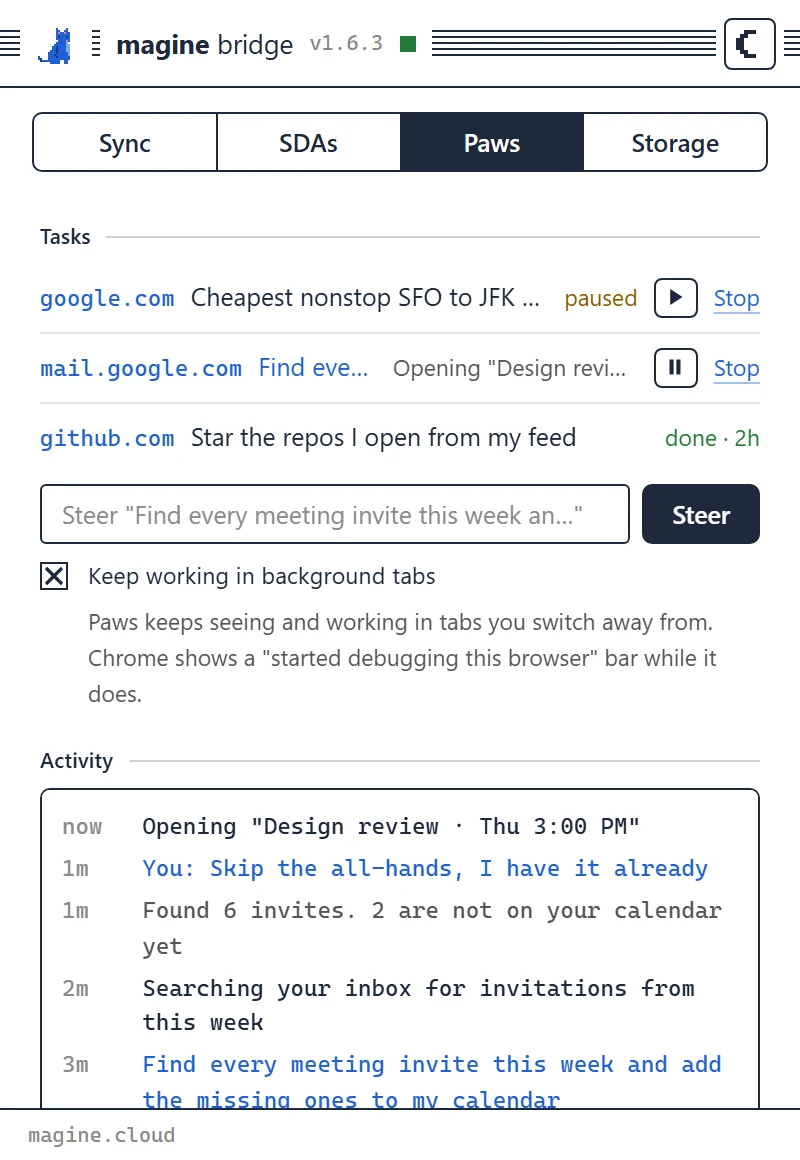
$Find every meeting invite in my inbox this week, add the ones missing from my calendar, and draft a reply to anything that clashes.

  1. 01Searches your inbox for this week’s invitations.
  2. 02Opens each one and checks the slot in Google Calendar.
  3. 03Adds the missing ones, join links included.
  4. 04Drafts a reply for each clash and leaves it for you to send.
mail.google.comcalendar.google.com

Your week on your calendar, and nothing sent without you.
Travel

Flights, booked.

$Book the cheapest nonstop flights from SFO to JFK this Friday after 5 PM, aisle seat, the way @flight-scout knows I like it. Match the return to the dates in #itinerary.png.

  1. 01Opens flight search in a background tab, nonstop, after 5 PM.
  2. 02Reads the return date straight off your itinerary picture.
  3. 03Compares fares and picks an aisle seat.
  4. 04Books with the card already saved on the airline’s site. Paws never types card numbers.
  5. 05Saves the confirmation to your Cattery.
google.com/travelyour airline

It books because you said book. Leave that word out and it brings you the three best fares instead.

Code

Breaking changes, patched.

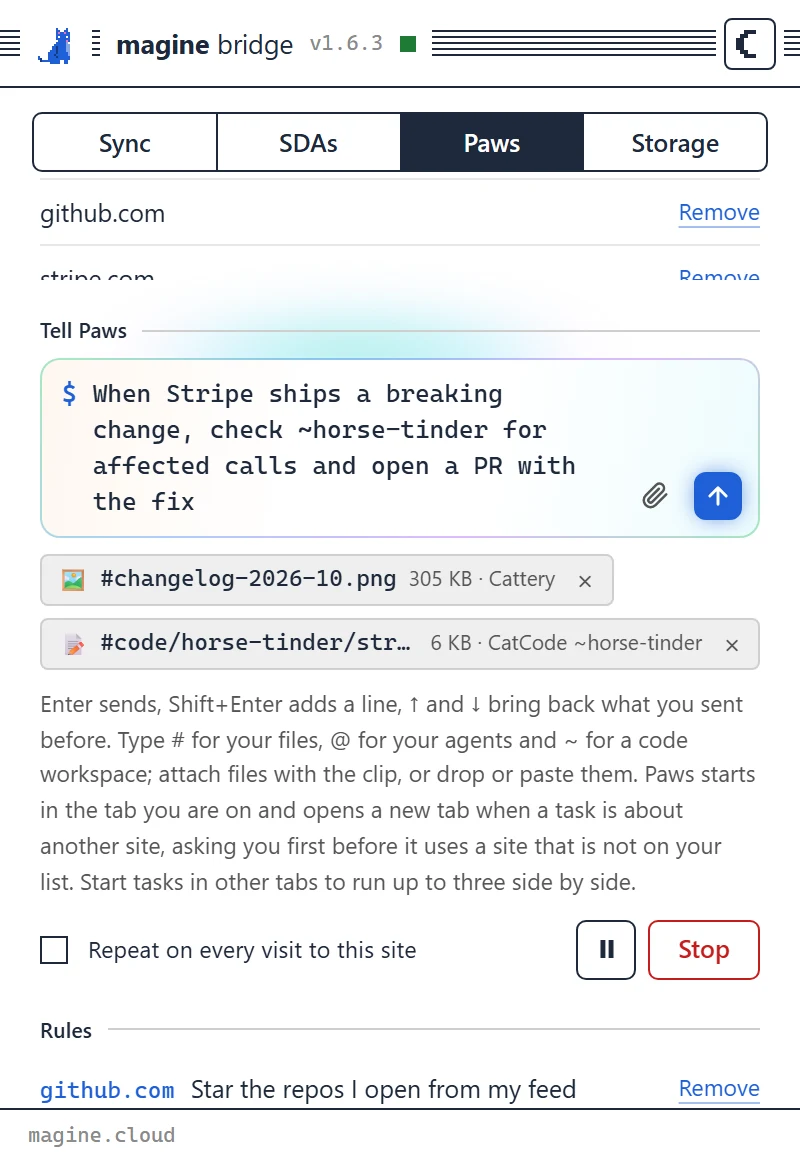
$When Stripe’s changelog ships a breaking change, find every affected call in ~horse-tinder, write the fix and open a pull request on GitHub.

  1. 01Reads the new changelog entry the moment you open it, as a rule that repeats on every visit.
  2. 02Checks ~horse-tinder, your CatCode workspace, for every call that changed.
  3. 03Writes the fix into the workspace.
  4. 04Opens the pull request in your signed-in GitHub, with the changelog linked.
stripe.comgithub.com

You review a pull request instead of reading a changelog.

Or just saySave every product photo on this page to my CatteryApply with #resume.pdf to every product role on this boardFill in this expense report from #receipt-0425.pngUnsubscribe me from newsletters I have not opened in a monthTurn this pricing table into a CSV in my Cattery
IN YOUR TOOLBAR

Everything in one
small window.

The real Magine Bridge popup

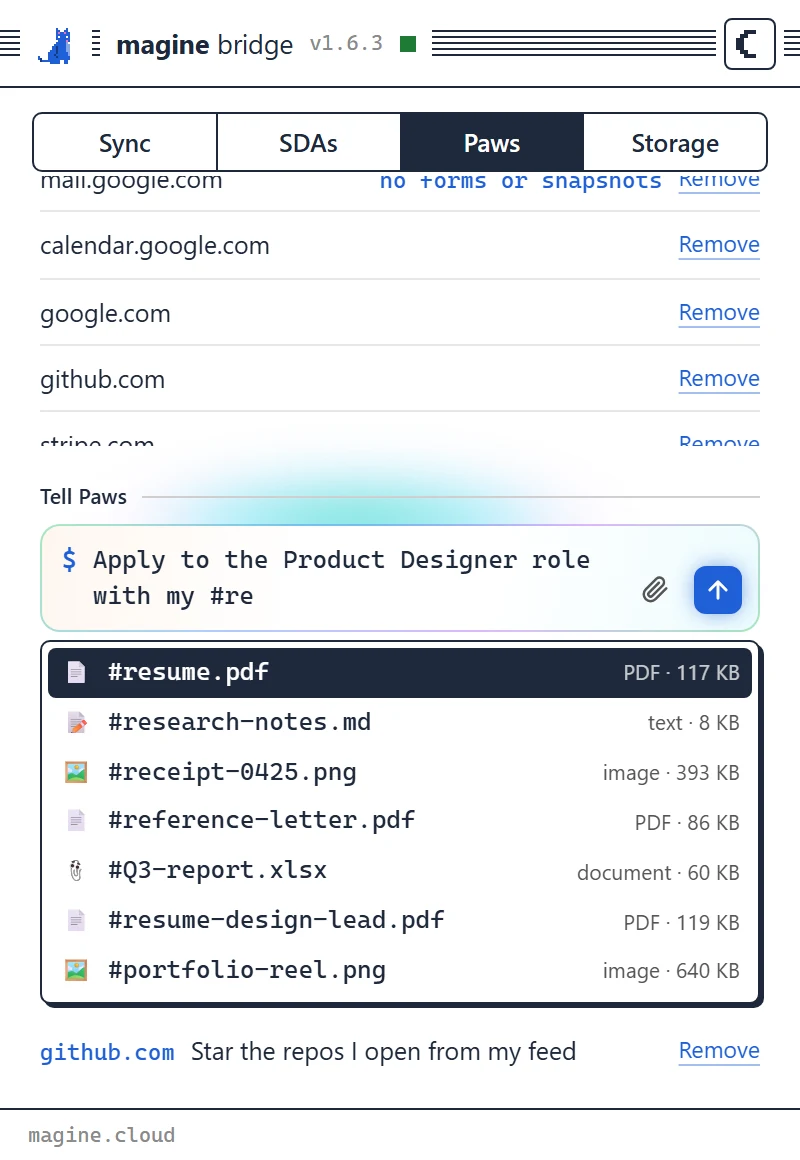
Magine Bridge popup, Paws tab: Type #, pick a file.
Type #, pick a file.

Your files, agents and workspaces, as you type.

Magine Bridge popup, Paws tab: Watch every step.
Watch every step.

Up to three tasks, one per tab. Pause, steer or stop each one.

Magine Bridge popup, Paws tab: Attach, tag, send.
Attach, tag, send.

Files upload while you type. Pictures to your Cattery, code to CatCode.

YOU HOLD THE LEASH

Clever paws.
Clear boundaries.

Only the sites you allow

Paws does nothing on a site until you add it, and never reads private windows.

It asks before it commits

Paying, sending, submitting and deleting only happen when your own words asked for them.

Secrets stay yours

Paws never types passwords or card numbers, and secret fields are masked in every screenshot.

Stop means stop

A Stop button on the page and in the popup ends the task at once.

Every step on the record

The activity feed shows what Paws is doing as it does it.

Self-hosted sandbox

Paws lives in your browser as an extension and works on your machine, inside the sites you allow, like a sandbox.

Hand the clicking to Paws.

Turn on for free

READ THE DOCS
  1. STEP 1
    Install Magine Bridge

    From the Chrome Web Store or Firefox Add-ons.

  2. STEP 2
    Link your account

    Create a Magine account, then link the extension with a pairing code.

  3. STEP 3
    Turn on Paws

    Allow a site, then tell Paws what to do.

Paws are live